
Five rivals in depth, eight on the table The honest guide to interior design software.
Each checked on what a studio asks: the price, Xero and UK VAT, and a warning before an order is late. Price, Xero and late orders, checked. Where a rival is better, we say so.
Free for 30 days, no card. We move your schedules across free.
The category
What you are actually choosing between.
Every serious tool here will hold a product library, raise a purchase order, publish a schedule to a client and produce an invoice. Compare those and you are comparing table stakes.
The differences that survive a real project are narrower. Does the system know when an order has to be placed, not only when it was? Does the money reach your accounts in the right currency with the right VAT, or does someone re-key it? Does the quoted price still describe the bill once the studio has six people and twelve live jobs?
Side by side
Pick your comparison.
The short verdict each way. Each page carries the full feature matrix, the cost and what moving across involves.
- Techstyles vs ProgramaAustralian-born studio software known for procurementChoose Programa ifyou want the lowest price per seat for a team, or take client payments in the app.Choose Techstyles ifyou want order-by dates from the install, Xero both ways and a contractor portal.
- Techstyles vs Houzz ProAll-in-one software alongside the Houzz marketplaceChoose Houzz Pro ifHouzz brings you clients, or you want 3D floor plans in the same tool.Choose Techstyles ifyou win work by referral and want delivery, Xero and a lower bill per seat.
- Techstyles vs Design ManagerLong-established software with its own accounting ledgerChoose Design Manager ifyou want full accounting inside the design tool, billed in dollars.Choose Techstyles ifyour books live in Xero, in pounds, and late orders are the risk.
- Techstyles vs Studio DesignerUS design business software with an accounting heritageChoose Studio Designer ifyou want its ledger and are primarily US-based.Choose Techstyles ifyour UK accountant expects the books in Xero, with VAT on the line.
- Techstyles vs DesignFilesBoards-first software for solo designersChoose DesignFiles ifyou work solo on boards, 3D and presentations and want the lowest price.Choose Techstyles ifyou specify and order, hold deposits and brief contractors.
Also worth a look: Planify, if you want a simple tool for the whole studio at one low price ($24.49 a month billed yearly, unlimited team) and keep your accounts separately. Fohlio, if your work is hospitality or multi-site FF&E at scale.
At a glance
Eight tools on the table, the UK questions.
Price, books and install-date risk, from each vendor’s own pages. Prices as published, in the currency published. “Not listed” means we could not find it, not that it cannot be done.
| Tool | Built for | Published price a month | Books and Xero | Install-date FF&E risk |
|---|---|---|---|---|
| Techstyles | Studios; built in the UK | £49 per user, £39 from the sixth, excl. VAT | Two-way Xero, GBP and UK VAT | Order-by date per item, from the install |
| Programa | Australian-born, multi-market | £55 incl. one seat, +£23 per seat, billed yearly (£69 + £29 monthly) | Invoices sync to Xero or QuickBooks | Overdue alerts once a date passes |
| Houzz Pro | Renovation and design pros, with the Houzz marketplace | From £139, +£47 per extra user | QuickBooks; Xero listed (sends data to Xero), plan not stated | Not listed |
| Design Manager | “Optimized for US-based firms” | $79 per user (US dollars) | Its own ledger; Xero not listed | Not listed |
| Studio Designer | Firms wanting accounting built in | $69–$109, billed yearly (no GBP listed) | Its own general ledger; Xero not listed | Not listed |
| DesignFiles | Solo designers and small teams | $55–$75 for one designer, +$30 per user | QuickBooks on Full Service; Xero not listed | Not listed |
| Planify | Designers and architects; made in Kraków | $24.49 for the studio, billed yearly | No accounting link listed | Not listed |
| Fohlio | Hospitality, retail and large firms | Not published | Not listed | Not listed |
- Techstyles
- Built for
- Studios; built in the UK
- Price a month
- £49 per user, £39 from the sixth, excl. VAT
- Books and Xero
- Two-way Xero, GBP and UK VAT
- Install-date risk
- Order-by date per item, from the install
- Programa
- Built for
- Australian-born, multi-market
- Price a month
- £55 incl. one seat, +£23 per seat, billed yearly (£69 + £29 monthly)
- Books and Xero
- Invoices sync to Xero or QuickBooks
- Install-date risk
- Overdue alerts once a date passes
- Houzz Pro
- Built for
- Renovation and design pros, with the Houzz marketplace
- Price a month
- From £139, +£47 per extra user
- Books and Xero
- QuickBooks; Xero listed (sends data to Xero), plan not stated
- Install-date risk
- Not listed
- Design Manager
- Built for
- “Optimized for US-based firms”
- Price a month
- $79 per user (US dollars)
- Books and Xero
- Its own ledger; Xero not listed
- Install-date risk
- Not listed
- Studio Designer
- Built for
- Firms wanting accounting built in
- Price a month
- $69–$109, billed yearly (no GBP listed)
- Books and Xero
- Its own general ledger; Xero not listed
- Install-date risk
- Not listed
- DesignFiles
- Built for
- Solo designers and small teams
- Price a month
- $55–$75 for one designer, +$30 per user
- Books and Xero
- QuickBooks on Full Service; Xero not listed
- Install-date risk
- Not listed
- Planify
- Built for
- Designers and architects; made in Kraków
- Price a month
- $24.49 for the studio, billed yearly
- Books and Xero
- No accounting link listed
- Install-date risk
- Not listed
- Fohlio
- Built for
- Hospitality, retail and large firms
- Price a month
- Not published
- Books and Xero
- Not listed
- Install-date risk
- Not listed
Last checked October 2026, from each vendor’s own pages. Products change; tell us if something has moved on.
Predictive, not reactive
The expensive mistake is the order nobody has placed yet.
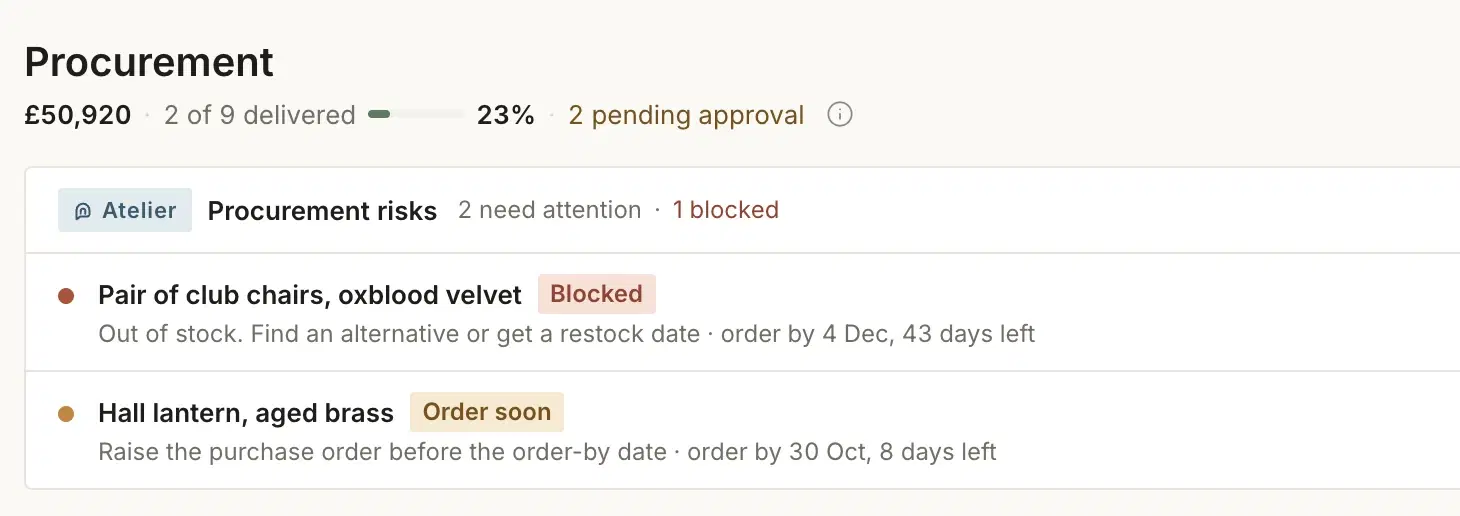
Every tool here can tell you what you ordered. The question that costs a studio money is about the order nobody has placed, and only a system that holds lead times against an install date can answer it.
Techstyles gives every line an order-by date and scores it blocked, at risk, watching or OK.
How to choose
How to choose interior design software: five questions for every vendor.
Including us. If a demo cannot answer these in the product, the answer is no.
- Show me an item nobody has ordered yet that is already too late.
- The question that separates a procurement ledger from a risk system. A tool that reports on placed orders cannot answer it. Ask to see the item, the lead time it used, and the date it decided the order window closed.
- Raise an invoice in GBP with VAT, show it in Xero, then pay it and show the payment back.
- Both directions, in one demo, without a CSV. If the answer involves a monthly reconciliation, that is your answer.
- Price this for six people and twelve live projects, with everything we just saw switched on.
- Not the entry tier. Ask which features in the demo sit on a higher plan, whether there is a per-project charge, and what onboarding costs on top.
- How does a contractor see what they need, and nothing else?
- Trades need the schedule and the drawings without your margins. A tool with no contractor access makes you the inbox between them and the job.
- If we leave in a year, what comes with us?
- Ask for the export format for your product library, clients and project history before you sign, not after. Any vendor confident in the product will answer plainly. We will.
Method
How we write these comparisons.
Every comparison here is written by us, so read it as our view rather than an independent review. We describe each competitor from its own published material. Where we cannot find a capability we say “not listed”, never “no”, and we quote a rival’s price only where they publish it. Last checked October 2026.
Competitors ship changes constantly. If something here is out of date, tell us and we will correct it.
Further readingThe best interior design software for UK studios in 2026
See your own schedule scored against its install dates.
Bring one live project from whichever tool you use; we move it across for you.