
AI assistant for interior designers The supplier email, already drafted.
Ask Atelier, the Techstyles AI assistant, what is late. It answers from your own records and drafts the email; you check it and send it.
Founding round: 50 studios, approved weekly. We move your schedules across free.

What it does
Six jobs, done quietly.
It works on the records you already keep, inside Techstyles. Ask Atelier a question, or let the brief, the summaries and the risk insights come to you.
- Atelier
- Ask about any project: what is late, what is unpaid, who is overloaded. It drafts client and supplier emails with the project details in, and proposes changes (tasks, order dates, purchase orders, invoices) that only happen when you confirm. It remembers each conversation.
- Daily brief
- Each morning: today’s meetings, overdue tasks and how every project is tracking.
- Inbox summaries
- Connect Gmail and Techstyles summarises a supplier or client thread and suggests the tasks in it. You choose which become real.
- Meeting notes
- Record a meeting or upload a transcript: a summary, highlights and action items you accept as tasks.
- Procurement risk
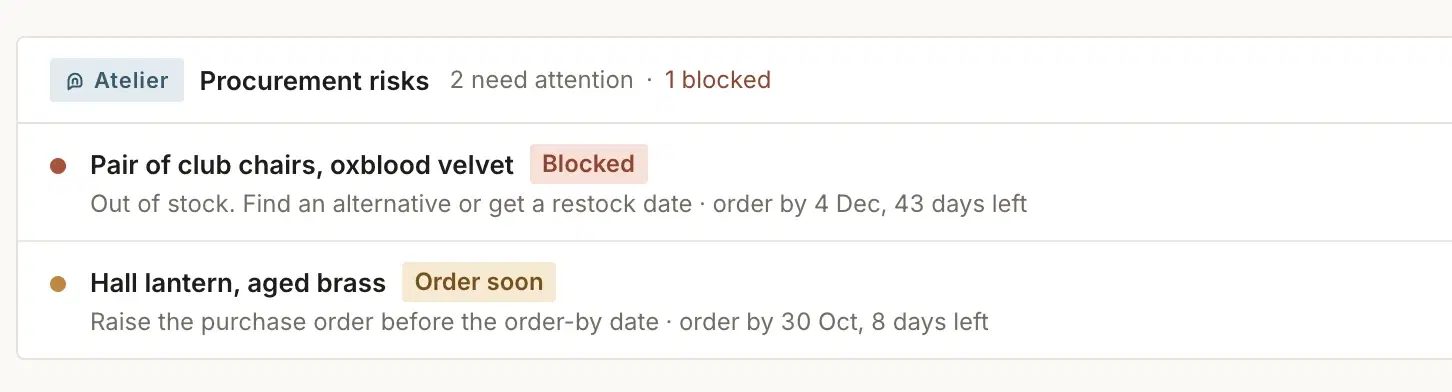
- When an item will miss its install date, the project shows why and what to do next.
- Smart Fill
- The Product Clipper reads a supplier’s product page and fills in price, finish, dimensions and lead time for you to check before saving.
Daily brief and risk insights
Before your first coffee, the day in order.
Each morning the brief sets out today’s meetings, overdue tasks and how every project is tracking. When an item will miss its install date, the project shows why and what to do next.
The rule
Nothing is sent or saved until you approve it.
- Drafted
An email, a summary or a proposed change is prepared for you.
- Waiting for you
You read it, change it or bin it. Nothing moves on its own.
- Then you act
A change happens only when you confirm it. An email leaves only when you send it yourself.
See it at work inProcurementFinanceClient portalPricing
Further readingAI for interior designers: where it helps a studio today, and where it should not
What does Techstyles AI actually do?
It helps with the admin, inside the projects you already run. Atelier, the Techstyles assistant, answers questions about any project, drafts client and supplier emails and proposes changes you confirm. Alongside it: a daily brief each morning, inbox summaries from Gmail, meeting notes from a recording or transcript, procurement risk insights, and Smart Fill in the Product Clipper.
Does it send or change anything without my approval?
No. Atelier drafts emails for you to copy and send yourself; it never sends them. Changes to tasks, order dates, purchase orders and invoices happen only when you confirm, and suggested tasks from your inbox or a meeting become real only when you accept them.
Is it a chatbot?
Yes. Atelier is a chat inside Techstyles that answers from your own project records. It remembers each conversation, so a follow-up question keeps its context.
Does the AI cost extra?
No, it is included in the subscription, at £49 per user a month (£39 from the sixth user), excluding VAT. Atelier, meeting notes and Smart Fill draw on a monthly AI allowance; the daily brief, inbox summaries and risk insights do not.
Less admin, the same final word.
Founding round: 50 studios, approved weekly. We move your schedules across free.
